
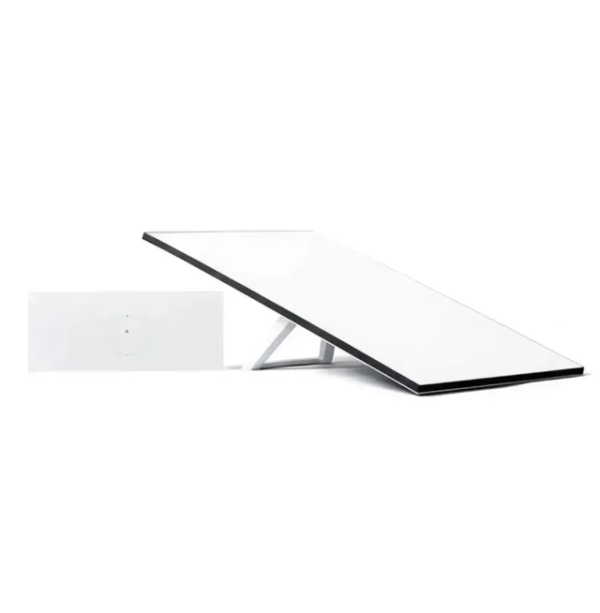
Starlink Standard

2

Starlink Standard

The Starlink Standard is the fixed-site terminal Satmodo sells to most business customers: a larger panel, a separate Wi-Fi 6 router, and enough coverage for a building rather than a backpack. This page covers the hardware, the box contents and what the install actually needs.

Business and enterprise service.
The Starlink Standard terminal

The Starlink Standard is the terminal most fixed business sites should buy.

It pairs a 297 m² Wi-Fi 6 footprint with a separate Router 3 unit — enough for a small office, a workshop or a multi-room building rather than a single room. It is not the lightest terminal Satmodo sells and it is not the toughest; those are different products, covered below.

  • Coverage: up to 297 m² (3,200 ft²) of Wi-Fi 6 from Router 3, roughly three times the Mini's footprint.
  • Devices: connects up to 235 devices at once, against the Mini's 128.
  • Weight: 2.9 kg (6.4 lb) bare — more once it's mounted and cabled, so check the table before planning the install.
  • Not for: anyone carrying it in a pack, or a site that needs an IP69K, pressure-washable panel.
Fit check

Who the Standard suits — and who it doesn't

The Standard is built for a site that stays put: an office, a workshop, or a fixed base aboard a vessel that doesn't need the panel repositioned often. If the job is a permanent connection for a building or a crew working out of one location, this is the terminal to start with.

It is not the right choice in two directions. If it needs to travel in a pack, the Starlink Mini is the lighter, self-contained option — it trades coverage for size. If the site is genuinely hostile — heat or cold beyond -30°C to 50°C, a deck that gets pressure-washed, or wind beyond an operational 96 kph+ — step up to the Starlink Performance, which is rated for far more and carries a published speed figure the Standard's sheet does not.

The numbers

Specifications

Every figure below comes from Starlink's own published spec sheet for this model. There is no listed download, upload or latency figure for the Standard — only Performance publishes one.

SpecStarlink Standard
Panel dimensions594 x 383 x 39.7 mm (23.4 x 15.07 x 1.5 in)
Panel weight (bare)2.9 kg (6.4 lb)
Weight with kickstand3.2 kg (7 lb)
Weight with kickstand & 15 m cable3.8 kg (8.3 lb)
Field of view110°
Environmental ratingIP67 Type 4
Operating temperature-30°C to 50°C (-22°F to 122°F)
Wind speed (operational)96 kph+ (60 mph+)
Snow melt rateUp to 40 mm/hour (1.5 in/hour)
Power consumptionAverage 75–100 W
Wi-Fi802.11 a/b/g/n/ac/ax (Wi-Fi 6)
Wi-Fi coverageUp to 297 m² (3,200 ft²)
Devices supportedUp to 235
RouterRouter 3, separate unit — 0.57 kg (1.25 lb)
MeshCompatible with Starlink Gen 2 and Router 3 mesh nodes, up to 3 nodes
Package weight6.73 kg (14.83 lb)

The three weight figures are not interchangeable — bare panel, with kickstand, and with kickstand plus 15 m cable are three different numbers. Use the one that matches how it will actually be sited.

In the carton

What's in the box

The box contains: Standard, Kickstand, Router 3, Starlink Cable, AC Power Cable, Power Supply. That's the complete list from the spec sheet — nothing added, nothing assumed.

Two things worth knowing before it arrives. The router is a separate box from the panel, not built in, so it needs its own spot near power and wherever the Wi-Fi should originate from. And Wi-Fi mesh nodes are not in this carton — Router 3 is compatible with up to three Starlink mesh nodes, but they are a separate purchase if the coverage needs to reach further than one router can manage.

Install

Mounting, cabling and Wi-Fi

The kickstand in the box is a ground or flat-surface mount — fine for a temporary siting, less so for a permanent install exposed to wind. For a pole, rail, wall or vehicle mount, see Starlink accessories, where mounts are sold by terminal — a Standard adapter will not fit a Performance panel, so match the model before ordering.

The supplied cable is the run between the panel and Router 3; if the router needs to sit further away than that length allows, a longer replacement cable is on the same accessories page rather than something to splice yourself. Once wired, Router 3's Wi-Fi 6 radio serves the site — up to 297 m² and 235 devices, extendable with mesh nodes if one router cannot reach every corner of the building.

Service

Choosing a plan

The Standard is hardware only — it needs a plan to go online, a separate decision from the terminal. A site that never leaves its region does best on a Local plan, priced per gigabyte for that region; a site that crosses borders, or a vessel that leaves territorial waters, needs a Global plan instead, because a regional plan used outside its region is not a slow connection, it is no connection at all. Mobility is included on every plan Satmodo sells, so moving the Standard between two fixed sites in the same region is never an upgrade question.

Compare allowances at the plans shop, or read how the structure works first at Starlink plans explained.

On satmodo.com

Buying the Standard

The Standard as Satmodo lists it, with current stock and price.

Questions

Frequently asked

No — Satmodo also carries a Standard 4 X variant elsewhere in the range, but there is no separate published spec sheet for it, so this page and every number on it are for the Standard 4 only. Ask before assuming the two are interchangeable.
It needs Router 3, a separate unit included in the carton — unlike the Mini, which has Wi-Fi built into the dish itself. That means another cable run and another spot with power to plan for, not just the panel.
Not reliably. The panel needs a clear view of the sky, and partial obstruction shows up as dropouts rather than just slower speed. If trees, a roofline or a hillside are in the way, plan the mount position around that before ordering, not after.
The Standard ships with an AC power supply, not a DC-only kit. Off-grid sites need to plan power separately — see powering Starlink off grid for how that is usually solved.
No. Router 3 supports up to three Starlink mesh nodes, but none are included — they are bought separately if one router does not reach every part of the building.
Do not use the bare panel figure alone. 2.9 kg (6.4 lb) is the panel; with the kickstand it is 3.2 kg (7 lb); with the kickstand and the 15 m cable it is 3.8 kg (8.3 lb). Use whichever matches how it will actually be sited.
The kickstand suits a flat surface or a temporary siting. For a roof, mast, rail or wall, a Standard-specific adapter is sold on the accessories page — mounts are not interchangeable between models, so confirm the fit for this panel.
Yes — call (800) 279-2366 and describe the site: indoor or outdoor space, how many people, whether it ever moves. We'll confirm the Standard is the right call or point you to the Mini or Performance instead.
Loading...

Buyer’s Guide: Key Upgrades in the Starlink Gen 3

The Standard Gen 3 kit addresses the biggest requests from the Starlink community. If you are choosing between models or looking to upgrade, here are the three critical improvements that define this hardware:

Streamlined Design with No Moving Parts

The most visible change is the removal of the motors. The Gen 3 antenna features a built-in kickstand and uses a software-assisted manual alignment tool in the Starlink app. By eliminating the motors, the dish is significantly thinner and lighter, making it ideal for portable use or flat-packing in a vehicle. This static design also improves reliability, as there are fewer mechanical components to fail in high winds or icy conditions.

Wi-Fi 6 Router with Built-In Ethernet

For many users, the return of standard ports is the biggest selling point. The Gen 3 Router includes two dedicated RJ45 ethernet ports hidden behind a protective cover. This means you no longer need to purchase a separate, expensive adapter to wire in your desktop PC, gaming console, or third-party mesh system. Combined with Wi-Fi 6 (802.11ax), this router manages network traffic more efficiently, providing smoother streaming and gaming experiences even when multiple devices are connected.

Enhanced Weather Resistance

Durability has been boosted with an improved IP67 rating for the antenna (up from the Gen 2’s IP54). This means the Standard Gen 3 is fully dust-tight and can withstand temporary submersion in water, giving you greater peace of mind during severe thunderstorms or floods. The new flat-panel design also boasts a 110-degree field of view, allowing it to maintain a stronger lock on satellites and recover faster from obstructions than previous generations.

Loading...